
Draw a window. Handle a frame.
An original Windows immediate-mode GUI with familiar Button, Label, Toggle and Slider controls.
Keep the state in your program.
CHUD GUI follows the immediate-mode redraw/event pattern popularized by Unity IMGUI. It is an original Win32/GDI implementation, not the Unity library, and requires no Unity, browser or .NET runtime.
use CHUD.GUI;
use CHUD.GUILayout;

public func Main() -> int {
    mut clicks = 0;
    mut enabled = true;
    mut volume = 50;
    CHUD.GUI.Open("CHUD dashboard", 560, 440);
    while CHUD.GUI.BeginFrame() {
        CHUD.GUILayout.Label("My CHUD application");
        CHUD.GUILayout.Value("Clicks", clicks);
        if CHUD.GUILayout.Button("Add one") { clicks += 1; }
        enabled = CHUD.GUILayout.Toggle("Enable sound", enabled);
        volume = CHUD.GUILayout.Slider("Volume", volume, 0, 100);
        if CHUD.GUILayout.Button("Close") { CHUD.GUI.Close(); }
        CHUD.GUI.EndFrame();
    }
    return 0;
}
Open. Begin. Draw. End.
| Call | Contract |
|---|---|
GUI.Open(title, width, height) | One window; initial client size 240..3840 × 160..2160. Resizable. Open another only after the previous one has closed. |
GUI.BeginFrame() → bool | Pump messages, clear the backing canvas and reset automatic layout. False means the window closed. Minimized windows wait for messages without busy-spinning. |
GUI.EndFrame() | Present the double-buffered canvas and sleep 16 ms. Pair with every successful BeginFrame. |
GUI.Close() | Request close. Finish the current EndFrame; the next BeginFrame returns false. Title-bar Close and Escape also finish the loop. |
Manual rectangles or automatic layout.
| API | Behavior |
|---|---|
GUI.Label / Button / Box(x,y,width,height,text) | Client coordinates; positive width/height up to 32768, x/y within −32768..32768. Off-window content is clipped. Button returns one activation frame. |
GUILayout.Label(text) | One line of UTF-8 text |
GUILayout.Value(label, int) | A number without a new CHUD string each frame |
GUILayout.Button(text) → bool | Full-width button |
GUILayout.Toggle(text, bool) → bool | Return the next bool; assign it back |
GUILayout.Slider(label, value, minimum, maximum) → int | Inclusive integer range, minimum smaller than maximum; assign the result back |
GUILayout.Space(pixels) | Add 0..4096 pixels of vertical spacing |
Automatic layout uses 18-pixel outer margins and follows the client width. Keep content within the client height; the first version does not scroll.
Mouse and keyboard.
Press and release inside a button to activate it. Drag sliders from their press area. Tab/Shift+Tab move through controls in draw order; Enter/Space activate buttons/toggles; arrows adjust a focused slider by one integer. Keep interactive calls in stable order. Focus follows ordinal IDs if a branch hides/reorders controls.
Try a native example.
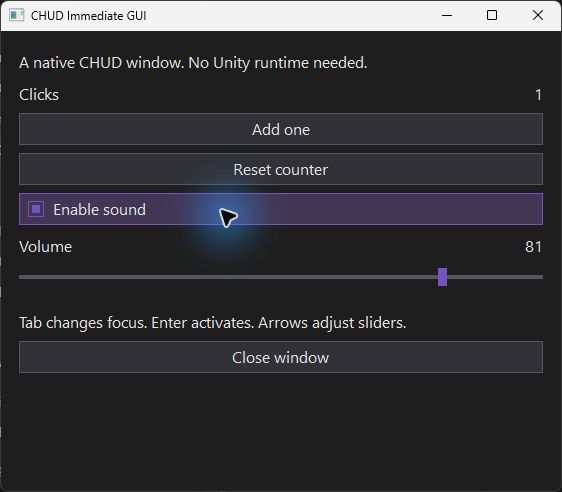
cd examples/ImmediateGUI
chud run
The Basic assistant also includes GUI counter and dashboard starters.
What this first version covers.
Windows only; one custom-drawn window, vertical layout or manual rectangles. No text fields, scroll views, multiple windows, docking, Unity skins/event types, automatic DPI scaling or screen-reader control tree yet. Coordinates follow the process’s Windows DPI mode. Native GUI resources are released during shutdown.